Introduction
The purpose of this blog post is to introduce pg_walviz, a new tool to visualize PostgreSQL WAL segment files.
pg_waldump is very
useful to display a human-readable rendering of the WAL. However, sometimes we
also want to see how records are physically stored in a segment: the WAL pages,
record fragments, continuation records, alignment padding, block references,
full-page images and raw bytes.
Welcome to pg_walviz
It is a read-only tool that displays a WAL segment in a local browser.
The interface is split into four synchronized views. Selecting a page or record in one view updates the others. One can also go directly to a page number, record number, file offset or LSN.
As a picture is worth a thousand words, let’s have a look at it:
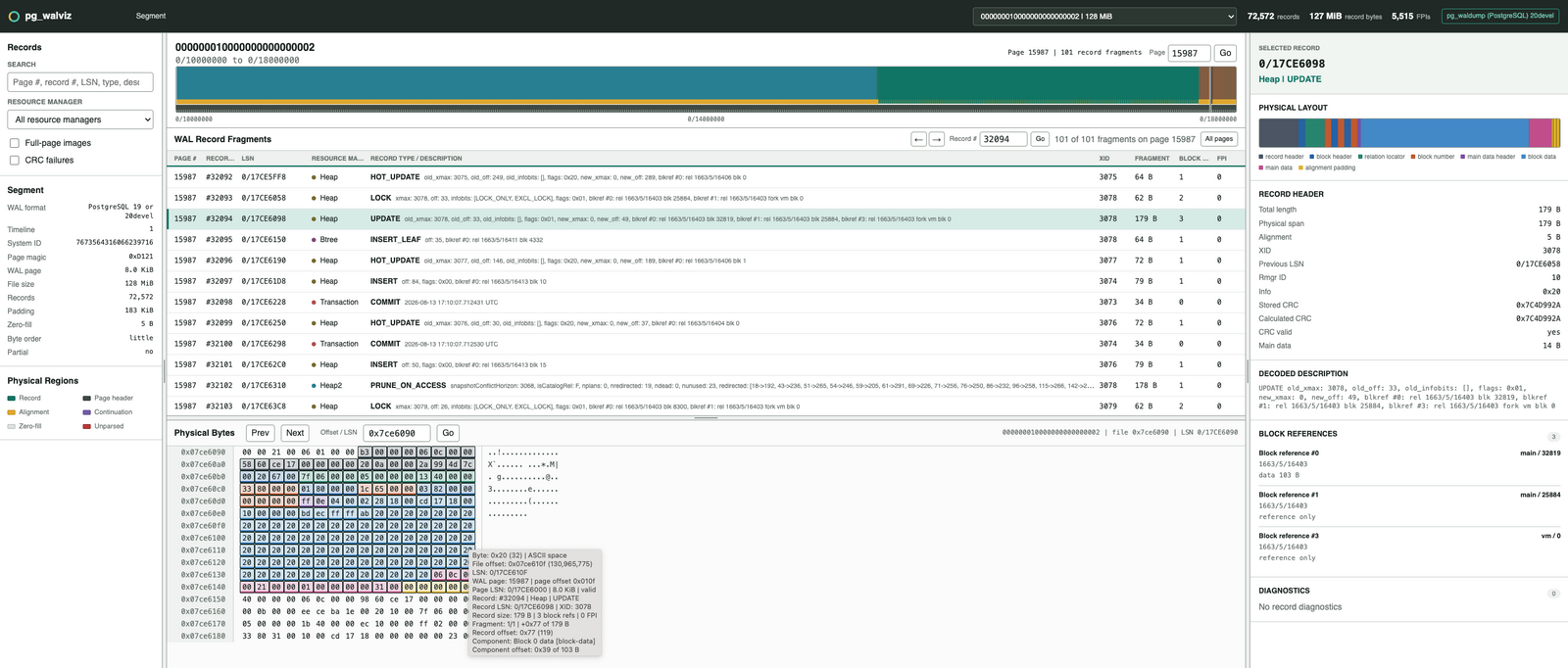
Segment overview
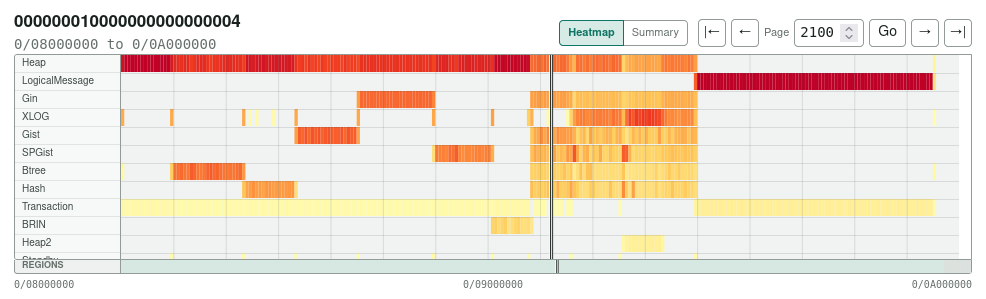
The heatmap shows where each resource manager writes WAL in the segment. Its horizontal axis represents WAL page ranges and its colors represent the amount of record data in each range. One can click a cell to inspect it or drag across pages to zoom. The Summary tab reports record and full-page-image bytes by resource manager.
WAL Record Fragments

The WAL Record Fragments panel lists the records stored on the selected WAL page. A record spanning several pages is displayed once on each page. One can filter the list or go directly to a page or record number.
Selected Record
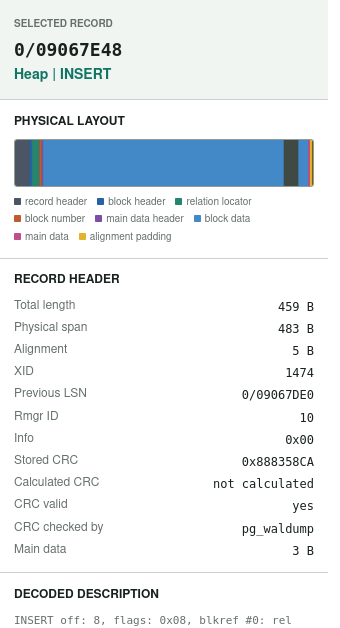
The Selected Record inspector displays the decoded record header, physical
layout, block references, full-page-image information, CRC and pg_waldump
description. The Physical Layout colors indicate record and block headers,
image headers, relation locators, block numbers, full-page images, block data,
main data and alignment padding.
Physical Bytes

The Physical Bytes panel displays the raw WAL bytes with colors matching the selected record’s Physical Layout. One can go directly to a file offset or LSN. Moving the mouse over a byte displays its value, file offset, LSN, WAL page, record, fragment, XID and decoded component.
How to use it
The current release is v0.1.0-beta.1 and can be found in this
repository.
One can inspect a WAL segment with:
~/pg_walviz/bin/pg_walviz \
  --pg-waldump /path/to/matching/postgres/bin/pg_waldump \
  /archive/000000010000000000000042
The tool starts a local HTTP server, opens the browser and binds to
127.0.0.1 by default.
No running PostgreSQL server or data directory is required. A directory or several consecutive segment files can also be provided, but inspecting one segment at a time is currently recommended.
For a remote or headless server, one can use:
~/pg_walviz/bin/pg_walviz --no-open --port 8765 \
  --pg-waldump /path/to/matching/postgres/bin/pg_waldump \
  /archive/000000010000000000000042
and create an SSH tunnel from the workstation:
ssh -N -L 8765:127.0.0.1:8765 user@server
Then http://127.0.0.1:8765/ can be opened locally.
Remarks
- Do not use the current, actively written WAL segment and do not point the
tool at the
pg_waldirectory of a running server. The metadata is parsed at startup while the raw bytes are read later. If the file changes or gets recycled, the metadata and bytes could disagree. Use completed archived segments or immutable copies instead. - WAL may contain sensitive data, so the viewer should only be exposed locally.
- WAL metadata is parsed at startup, so large segments or many small WAL records can take time to load. Fragment rows and record details are loaded on demand.
- Full-page images are located and their compression method and hole metadata are reported. They are not decompressed or reconstructed as PostgreSQL data pages.
- Please refer to the README for the complete compatibility and limitations list.
Conclusion
pg_walviz is a new utility that can be used to visualize the physical layout of PostgreSQL WAL segments.
It provides synchronized views from a complete segment down to its raw bytes,
while the optional pg_waldump integration adds the logical record
descriptions.
This is a first beta release and feedback is welcome.